Sunday, 4 November 2012

The Ram

The Ram is also known as Random Access Memory. They’re three main types of Ram: DDR, DDR2 and DDR3. DDR3 is the most modern and is also the fastest and cheapest. The Ram is used for loading files into once the pc is powered on. When your PC is booting up, it is loading all of the important files to the ram so it can boot quicker. The more Ram you have the better your computer will be at multitasking. To Run windows XP you need at least 512MB of ram, and vista needs at least 1GB of ram. But, a PC window 7 requires a whopping 3GB of Ram to run correctly! The more Ram you have the better. Also, the hard drive has something called a ‘’paging file’’ or virtual memory. This acts as extra Ram if the PC is running low on it. However virtual memory is very slow as it is using the hard drive, which is quite slow, so may cause your PC to crash. The Virtual memory needs to be 1.5x the amount of Ram you have. If you have more Ram than you require, you can turn it off by doing this: Start, Control Panel, System, and find the tap that says ‘’Virtual Memory And Processor Scheduling’’ Your Computer needs Ram or it won’t work.


Saturday, 3 November 2012


The Hard Drive
The hard drive or hard disk is where all your downloaded files, saved files, programs and Operating System is stored. Without the hard drive the computer will say ‘’reboot and select proper boot device or insert bootable media and press any key’’
When you put in a hard drive you have to put in an operating system disc other wise it would show the message above (The red text)
    When you are choosing a hard drive with at least 160GB of storage and at least 16MB of buffer memory. The buffer memory is what the drive uses to speed up data access. The more buffer memory, the faster file access.
       When you download or save files, you hard drive can be prone to viruses. Sometimes downloaded files can have a virus hidden in them. Once it is infected, the virus can duplicate itself and hides in lots off different places. It can even corrupt your hard drive!


IDE or SATA?
There are two types of connecting a Hard disk and optical drives. These different connections do the same job but at a different speed. IDE is the old way of connecting these devices. IDE has a transfer rate of up-to 150MBP/s which sounds fast butt isn’t that fast. SATA however, has a DATA rate of up-to 6GBP/s, which is very fast indeed. SATA is found on all modern SSD’s, HDD’s and optical drives. Because SATA is so fast, It has made IDE extinct in modern Computers (2007 and onwards). There is also the type of hard drive SSD or HDD. SSD’s have no moving parts, instead they sore data like a USB stick, Making them very strong. The downside to SSD’s is that the have a small Read/write cycles, it has 100,000 which is a very small amount. So, SATA is the better interface to go for.
SATA


IDE


How Computers Work

Today, I shall explain how computers work. There are 8 main parts in a computer and these are: Case, PSU, Ram, Hard drive, motherboard, optical drives, CPU and cooling.

The case: The case is where the motherboard, hard disks some fans, optical drives and PSU go. The Motherboard is held in with 6-8 screws (6 for m-ATX and 8 for ATX). The case has to be strong otherwise it leaves the components open to damage.

The PSU: The PSU or Power Supply Unit also mounts in the case and is held in by four screws. All PSU’s are different. They differ from wattage, CPU Power pins, and motherboard power pins. For the CPU power there are 4 or 8 pins. (8 for extreme editions or K series and 4 for standard). And there is 20 and 24-pin Motherboard connector. Most modern motherboards use 24-pin so that isn’t really a problem.

Ram: Ram or Random Access Memory is fitted onto the motherboard. There are 3 types of Ram, These are: DDR, DDR2 and DDR3. DDR3 is the most modern, is the fastest and also is the cheapest to buy. A Motherboard only supports one of these though. The more Ram you have the faster your computer will be.

Hard Drive: The hard drive is where the computer saves all of the downloads, Operating system, your personal files and anything else you save. The more Gigabytes or GB you have the more data you can save. There are two different types of hard drive, SSD or solid state drive and HDD or hard disk drive. (Will be explained in a future post) Your hard drive uses a connection called SATA or Serial ATA. SSD’s have no moving parts so are faster in data access than HDD’s.

Motherboard: The motherboard is where all of the devices connect to one way or another, either by a cable or by being sat on the motherboard i.e. Ram. There are many brands of motherboard like ASUS, Gigabyte and ASrock etc… Without it, tour PC wont even POST as it can’t do anything.

Optical Drives: Optical drives are for reading/burning data to a type of optical media i.e. CD. The drives are quite cheap to pick up so if your needing one it wound set you back more that £30.

CPU: The CPU or processor is what the computer uses to process your commands. The faster your CPU runs at, the quicker your PC will be. CPU speed is measured in GHZ. Another ting with processors it the amount of cores it has. For example a dual fore CPU has 2 processors on 1 chip.
Intel has thing called ‘Hyper Threading’. What it does is make a PC think the CPU has x2 as many cores as it has, making it run faster.


Thursday, 1 November 2012

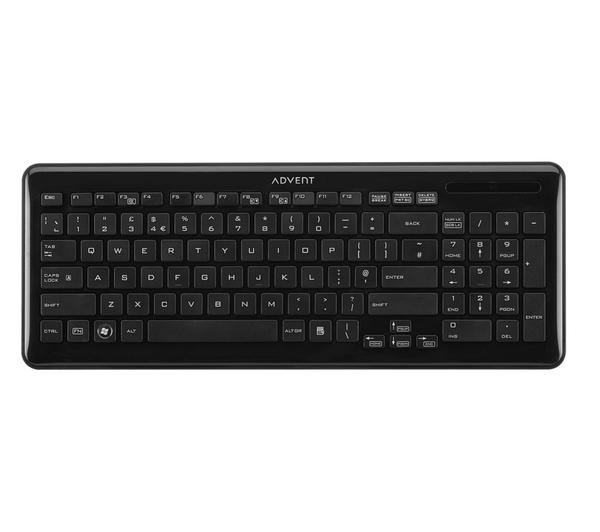
Advent k212 wireless keyboard review.
Advent has made a new keyboard for £15 that hasn't got messy wires to clog up your desk space. That is because it is wireless!
The wireless receiver is tiny (about the same size as a Lego man head). The range is good and typing if fluent. the keys are similar to the Apple iMac keys. The only difference is that these keys are spongier.

The looks are quite nice, it has a piano black finish and the keys are easy to read. However, the part where the num lock and other lights should be is non-existent. In its place is an Advent logo and a light to tell you when the battery is dying.

The Volume keys are part of the FN keys (Function). One thing that has become apparent is that the right control key is missing. Advent have done this to make it more compact.
So to round up this review, the keyboard is very well made and is easy to type on. i rate it 4 of 5 stars.

Pros: Nice finish, good keys, long range, small USB receiver and volume keys.

 Cons: no num lock, caps or scroll lock, and no right shift key.


Acer Aspire 5733Z
Review

Acer has made a laptop for £380.

The laptop is an Acre Aspire 57337. It has an Intel Pentium B680 running a 2.1GHZ and paired with 6GB of DDR3 Memory means for a confortable performance. The Rather spacious 500GB hard drive is made by western digital, and can store lots and lots of files!

However the 15.6” display isn’t that great as the picture is sometimes a bit pixelated even when using a 1920X1080 picture. The gloss display reflects light and collects fingerprints vey easily. The GPU, which is only the Intel HD graphics, has 128MB of memory, which is enough for basic things like surfing the web.

The battery life is on a whole different level,
It lasts a measly 3 hours with power save on and WI-FI off.
It is a 14v lithium ion battery. The charger gets very hot and sometimes cuts off.

The reliability isn’t too great as it often overheats for no apparent reason and sometimes BSOD’s if it crashes too bad.
The PC has a warranty of 5 Years so it’s covered.

The keyboard is a little hard to type on for touch typers as the key require a lot of force to press. The Keys are of a similar size to the Apple keys but aren’t as good to type on.
The track pad is ok but not the best. Sometimes the curser flicks about.

When typing a document or anything of the like it sometimes randomly freezes.

Overall, it’s a reasonable laptop but is a bit over-priced and unreliable it can handle most tasks well. I rate it 3 Stars.

Pros: Speed, webcam, Specs, ease of use
Cons: reliability, LCD resolution, price, battery life, Occasional crashing.